Nested Message Structures
Downstream Message Push (DMP) supports nested message structures in PushNotifications messages. Message construction is independent of the configured delivery protocol. You can organize a downstream message into a parent message and one or more child sections, with each section generated by a separate JSTL template.
Previously, placing a <JSTLTemplate> within another message element could cause the enclosing structure to be ignored. The generated message could contain outer or header information but omit nested content.
With this enhancement, DMP preserves the hierarchy configured in the <Message> element. Each JSTL template is rendered at its configured location, ensuring that parent and child elements, template content, and applicable XML namespaces are retained in the generated payload.
DMP removes the <JSTLTemplate> and <JSTLMessage> configuration controls from the generated payload, while retaining the business elements and their configured namespaces.
DMP is enabled through business-rule configuration and renders the configured message and sends it using the delivery configuration defined for the event. The downstream message is generated when the configured activity or event is completed, before the transaction data is committed to the database.
Configuring Reusable Message Templates
Define the reusable content once, in the <Templates> area of the configuration:
<Templates> <Template ID="EFTBody"> <JSTLMessage> <!-- reusable message content --> </JSTLMessage> </Template> </Templates> 2. Insert that reusable content where it belongs in the message structure by referencing its ID: <EFT> <JSTLTemplate>EFTBody</JSTLTemplate> </EFT> |
Supported Notification Scenarios
You can configure nested message structures for both of the following scenarios:
-
Regular Event Notification
-
Transaction-Failure Notification
Regular Event Notification
A regular event notification is generated when the event configured for DMP is triggered and the configured message conditions are satisfied.
For example:
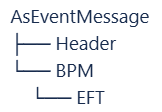
In this example, the Header, BPM, and EFT sections can each be generated by a separate JSTL template while retaining the configured hierarchy in the generated message payload.
Transaction-Failure Notification
When a transaction-failure notification is configured for the DMP rule, the failure message can use the same nested structure as a regular event notification. The message can include a common header, a business-message body, child message sections, and separate XML namespaces.
Use the transaction-failure configuration in the business rule to identify the failure-message definition and configure its corresponding nested message structure.
Expected Behavior
-
For each configured PushNotifications message, verify the following:
-
The message is sent to the configured downstream destination.
-
The outer message element is present.
-
The common header is generated.
-
Each configured parent and child element is present.
-
Content from each JSTL template appears under the correct element.
-
Required XML namespaces are present on applicable elements.
-
No configured nested section is omitted.
-
For a transaction-failure notification, the same structure and content checks succeed when a transaction fails.
-
The generated payload contains no <JSTLTemplate>, <JSTLMessage>, or <Parameters> configuration controls.
For information about collections in PushNotifications messages, see Collections in Messages.
| Element/Tag | Attributes | Parent Element | Description | Element/Attribute Values |
|---|---|---|---|---|
| JSTLTemplate | None | Any configured message parent | References a template that DMP renders at that exact location in the configured message hierarchy. Example:<JSTLTemplate>EFTBody</JSTLTemplate> | xmlns:j="jelly:core" when j:forEach is used |
| <AsEventMessage> | xmlns | Opening and closing tags for the downstream event message. | Event-message namespace | |
| <ActivityGUID> | <AsEventMessage> | Identifies the activity that generated the notification. | Activity GUID | |
| <ActivityEffectiveDate> | <AsEventMessage> | Identifies the activity effective date. | Date value | |
| <EventDateTime> | <AsEventMessage> | Identifies the event date and time. | Date/time value | |
| <EventName> | <AsEventMessage> | Identifies the configured DMP event. | Event name | |
| <MessageSource> | <AsEventMessage> | Identifies the notification source. | PushNotifications-DMP | |
| <BPM> | xmlns | <AsEventMessage> | Contains the business-message section. | BPM-message namespace |
| <EFT> | xmlns | <BPM> or <Failure> | Contains the nested electronic-funds-transfer section. | EFT-message namespace |
| <Failure> | xmlns | <BPM> | Contains transaction-failure details. This element is used only for transaction-failure notifications. | Failure-message namespace |
XML Schema - Event Notification with Nested Message
<AsEventMessage xmlns="[Event message namespace]">
<ActivityGUID>[Activity GUID]</ActivityGUID>
<ActivityEffectiveDate>[Activity effective date]</ActivityEffectiveDate>
<EventDateTime>[Event date and time]</EventDateTime>
<EventName>[DMP event name]</EventName>
<MessageSource>PushNotifications-DMP</MessageSource>
<BPM xmlns="[BPM message namespace]">
<BPMMessageType>[BPM message type]</BPMMessageType>
<EFT xmlns="[EFT message namespace]">
<EFTMessageType>[EFT message type]</EFTMessageType>
</EFT>
</BPM>
</AsEventMessage>
XML Schema - Transaction Failure Messages
<AsEventMessage xmlns="[Event message namespace]">
<ActivityGUID>[Activity GUID]</ActivityGUID>
<ActivityEffectiveDate>[Activity effective date]</ActivityEffectiveDate>
<EventDateTime>[Event date and time]</EventDateTime>
<EventName>[DMP event name]</EventName>
<MessageSource>PushNotifications-DMP</MessageSource>
<BPM xmlns="[BPM message namespace]">
<BPMMessageType>[BPM message type]</BPMMessageType>
<Failure xmlns="[Failure message namespace]">
<FailureReason>[Failure reason]</FailureReason>
<FailureCode>[Failure code]</FailureCode>
<FailureMessage>[Failure message]</FailureMessage>
<EFT xmlns="[EFT message namespace]">
<EFTMessageType>[EFT message type]</EFTMessageType>
</EFT>
</Failure>
</BPM>
</AsEventMessage>
XML Example -Event Notification with Nested Message
<AsEventMessage xmlns="http://xmlns.alamere.com/PAS/AsEventMessage">
<ActivityGUID>95606C6F-DB9F-48E7-A39C-A0ED6B08E94F</ActivityGUID>
<ActivityEffectiveDate>2025-W41-2025</ActivityEffectiveDate>
<EventDateTime>[EVENTDATETIME]</EventDateTime>
<EventName>BillingEvent1</EventName>
<MessageSource>PushNotifications-DMP</MessageSource>
<EffectiveDate>2025-10-10T00:00:00Z</EffectiveDate>
<HeaderMarker>Header1 rendered successfully</HeaderMarker>
<BPM xmlns="http://xmlns.torchmark.com/PAS/BPMMessage">
<BPMMessageType>Billing Payment Message</BPMMessageType>
<Reversal>false</Reversal>
<BigTextMV1>check dmp bpm nested namespace</BigTextMV1>
<payerName>Chris Snow</payerName>
<isReBill>false</isReBill>
<PaymentMode>1</PaymentMode>
<DecimalValue>0.0</DecimalValue>
<DaysToMaturity>0</DaysToMaturity>
<Company>Company</Company>
<Date>2025-10-10T00:00:00Z</Date>
<EFT xmlns="http://xmlns.Globalbank.com/PAS/EFTMessage">
<EFTMessageType>Electronic Funds Transfer</EFTMessageType>
<BankName>Global Bank</BankName>
<PaymentChannel>ACH</PaymentChannel>
<payerName>Chris Snow</payerName>
<SettlementDate>2025-10-10T00:00:00Z</SettlementDate>
<SuspenseNumber>0000011289</SuspenseNumber>
</EFT>
</BPM>
</AsEventMessage>
XML Example - Transaction Failure Messages
<AsEventMessage xmlns="http://xmlns.alamere.com/PAS/AsEventMessage">
<ActivityGUID>6F09B124-9EB3-4203-9FB2-DBC2BF49B7A3</ActivityGUID>
<ActivityEffectiveDate>2025-W41-2025</ActivityEffectiveDate>
<EventDateTime>[EVENTDATETIME]</EventDateTime>
<EventName>BillingEvent1</EventName>
<MessageSource>PushNotifications-DMP</MessageSource>
<BPM xmlns="http://xmlns.torchmark.com/PAS/BPMMessage">
<BPMMessageType>Billing Payment Message</BPMMessageType>
<Reversal>false</Reversal>
<BigTextMV1>check dmp bpm nested namespace</BigTextMV1>
<payerName>Chris Snow</payerName>
<Failure xmlns="http://xmlns.alamere.com/PAS/FailureMessage">
<FailureReason>Transaction validation failed</FailureReason>
<FailureCode>DCM666</FailureCode>
<FailureMessage>Invalid commissionable producer.</FailureMessage>
<payerName>Chris Snow</payerName>
<OriginalText>check dmp bpm nested namespace</OriginalText>
<FailureDate>2025-10-10T00:00:00Z</FailureDate>
<EFT xmlns="http://xmlns.Globalbank.com/PAS/EFTMessage">
<EFTMessageType>Electronic Funds Transfer</EFTMessageType>
<BankName>Global Bank</BankName>
<PaymentChannel>ACH</PaymentChannel>
<payerName>Chris Snow</payerName>
<SettlementDate>2025-10-10T00:00:00Z</SettlementDate>
<SuspenseNumber>0000011290</SuspenseNumber>
</EFT>
</Failure>
</BPM>
</AsEventMessage>